Honeywell Scanner Cable, USB Replacement Build
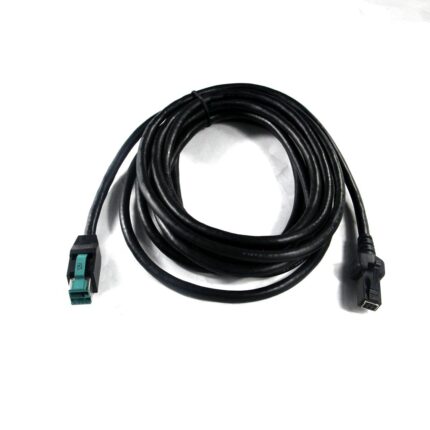
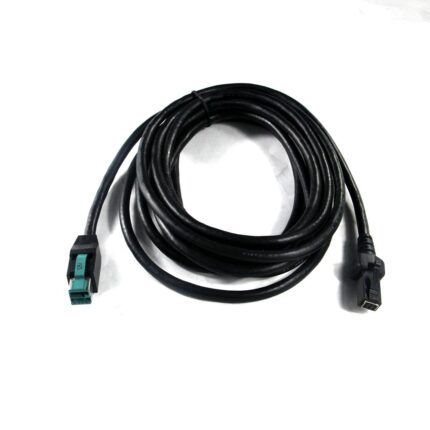
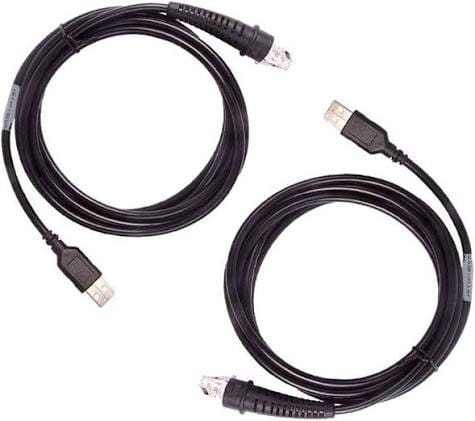
A replacement Honeywell scanner usb cable: USB or RS-232 host end, scanner-specific plug, extended strain relief, built to your model and pinout.
Overview
A Honeywell scanner usb cable is usually bought because the original one has stopped working at the worst possible moment: the scanner is fine, the host is fine, and the cable has gone open circuit just behind the strain relief at the scanner end. That is where these cables always fail, because the operator holds the scanner by the cable. We build the replacement to the scanner model and the pinout you name, with an extended strain relief so the flex happens in the cable rather than at the solder joints.
Key Specifications
| Host end | USB-A, or DB9 for RS-232 builds |
|---|---|
| Head end | Scanner-specific plug, per model |
| Interfaces | USB (5 V) and RS-232 platforms |
| Length | OEM build, typical 1 to 3 m |
| Jacket | PVC standard; PUR for harsh sites |
| Marking | Host end labeled with your part number |
| Strain relief | Molded, extended body at the scanner end |
| Build standard | Built to the pinout you send or the model you name |
Which host interface your site runs
The same scanner body can be ordered with a serial, USB or keyboard wedge cable, and the difference matters more than the connector shape. The interface decides what the host thinks the scanner is, and therefore what you have to configure at the host end:
| Host interface | What the host sees | What it needs at the host | Watch out for |
|---|---|---|---|
| USB HID | A keyboard | No driver, no configuration | Keystrokes land wherever the cursor is |
| USB CDC / serial | A COM port | Driver and correct COM number | COM number changes when the port changes |
| RS-232 | A serial device | Correct baud, parity and flow control | Needs a powered port or an external supply |
| Keyboard wedge | A keyboard via mini-DIN | A PS/2 port or an adapter | Not hot-plug on most hosts |
If you are replacing a cable, read the interface off the host end of the old one. If you are changing interface as well, tell us: the scanner end is the same shell, but the wiring is not.
Reading the scanner model off the unit
- Flip the scanner over. The label with the model and serial number is on the underside or under the handle boot, not on the cable.
- Note the full model string, including any suffix. Suffixes on the same family can mean different interfaces.
- Photograph the connector at the scanner straight on. The plug shape and the latch position identify the family.
- Count the conductors on the old cable if it is already cut. Four wires usually means USB; more than that usually means serial with handshaking or power.
- Check whether the scanner is powered from the host or from a separate supply. That changes the conductor sizes.
We supply to the interface you name and to the pinout you send. We do not claim to cover every scanner a brand has shipped.
Why the original cable dies
- Being carried by the cable. Operators swing the scanner by its lead. The flex concentrates at the molded relief and the conductors work harden until one goes open.
- Rolling chairs and trolleys. A cable that lies across a walkway gets run over repeatedly until the jacket splits.
- Tight coil storage. Wrapping the cable tightly around the scanner kinks the conductors at the same point every time.
- Cleaning chemicals at food and pharmaceutical sites attack a standard PVC jacket.
- Pulling the plug by the cable rather than the shell, which tears the latch off.
The host interface is ordinary USB on most of these builds, which is why a replacement can be a straight cable rather than a proprietary part.
Fitting and verifying a replacement
- Plug the host end in first, with the host running, and let it enumerate.
- Seat the scanner end until it is fully home. A part-seated plug gives intermittent reads that look like a dying scanner.
- Open a text editor and scan a known label. Confirm the characters and the terminating keystroke match what the host application expects.
- Wiggle the cable at both ends while scanning. If reads drop out, the plug is not seated or the cable is faulty.
- Test every symbology the site actually uses, not just the code on the test sheet.
Typical Applications for This Honeywell Scanner USB Cable
- Retail and grocery point of sale with a fixed terminal
- Warehouse receiving and put-away stations
- Pharmaceutical and food sites with regular washdown of the bench
- Production traceability stations reading part labels
- Field service vans where the scanner plugs into a laptop
How to specify your build
- Scanner model, in full, from the label.
- Host interface: USB HID, USB serial, or RS-232.
- Length, measured from the host to the operator hand at full reach.
- Cable style: straight or coiled.
- Jacket: PVC, or PUR where there are chemicals or grease.
- Marking with your part number if the fleet is labeled.
- Quantity, and whether this is a prototype or a production order.
Workmanship and testing
Assembly and inspection follow IPC/WHMA-A-620 Class 3 workmanship criteria under our ISO 9001 quality management system, and every unit passes 100% continuity and pinout testing before it is packed. Conductor range is 32 to 12 AWG. We can add a flex test on the production batch where the cable is going into a handheld application. Any figure quoted for the interface is the industry-standard value; the values your assembly is built and verified to are the ones stated on your drawing.
Every production run can ship with RoHS and REACH declarations and the electrical report agreed at quotation; see certifications and material declarations. UL styles and other named approvals are built to drawing: we source to the style you specify and document it, rather than asserting a listing we do not hold. Termination, molding and verification happen in-house see the assembly lines behind this build so the process that made your sample is the process that runs the order. Related reading: what instrument builds require. Tooling is quoted separately, cut in-house rather than brokered out, and owned by you.
Custom builds and ordering
Quote Honeywell Scanner builds from 1 to 50 pcs and they ship in 3 working days; at volume the minimum is 500 pcs with 14 working days after approval. Tooling not already held adds around 10 working days. OEM and ODM Honeywell runs go out under your part number and labeling and material certificates and first-article reports are available on request.
Related scanner and point of sale assemblies
Checkout and warehouse jobs usually need more than one of these:
- Zebra / Symbol Scanner Cable, USB, RS-232 or PS/2
- Barcode Scanner Cable with Coiled Cord, DB9 to RJ45
- IBM 12V Powered USB to 2×3 6-Pin Scanner Cable
- IBM 24V Powered USB to USB-B Scanner Cable
- NCR RealPOS 25 Powered USB Cable with DIN Power
- Datamax 210267 RJ11 plus USB Barcode Scanner Cable
- POS USB-C PD Cable for Kiosk and Self-Service Terminals
Full range: signal and data cable assemblies.
Replacement Questions
Do I have to buy the branded cable?
No. Send the scanner model and the host interface and we build to the pinout. We supply to the interface you name rather than claiming to match a brand catalog.
Which interface should I order?
Whatever the host expects. If the old cable had a USB-A end, order USB. If it had a DB9, order RS-232.
Can I have a longer cable?
Within what the interface allows, yes. Tell us the length and the interface and we will confirm what we can hold to.
The scanner powers up but does not scan.
Check the plug seating first, then the host interface mode. Both look like a cable fault and neither is.
What is the minimum order?
Quote Honeywell Scanner builds from 1 to 50 pcs and they ship in 3 working days; at volume the minimum is 500 pcs with 14 working days after sample approval.
| Host end | USB-A, or DB9 for RS-232 builds |
|---|---|
| Head end | Scanner-specific plug, per model |
| Interfaces | USB (5 V) and RS-232 platforms |
| Length | OEM build, typical 1 to 3 m |
| Jacket | PVC standard; PUR for harsh sites |
| Marking | Host end labeled with your part number |
| Strain relief | Molded, extended body at the scanner end |
| Build standard | Built to the pinout you send or the model you name |