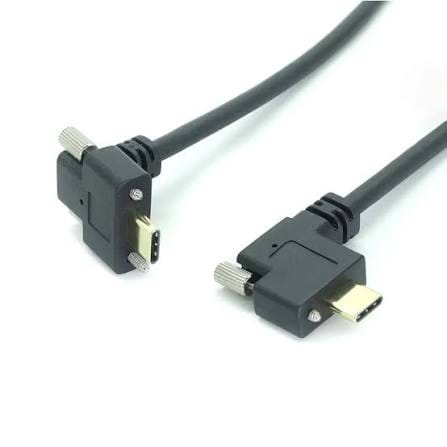
Right-Angle USB Type-C Male to Male Screw-Lock Cable (USB 3.1, 5 Gbps, 90 Degree, M2 Lock)
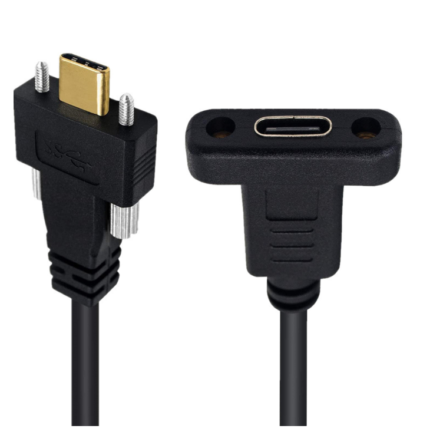
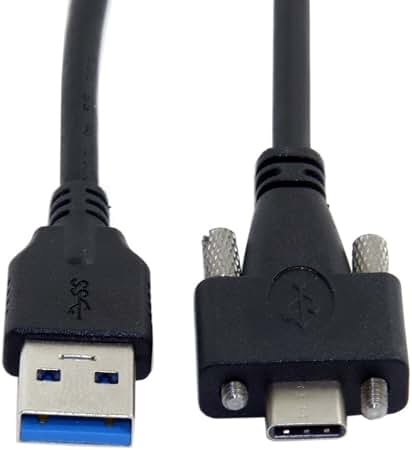
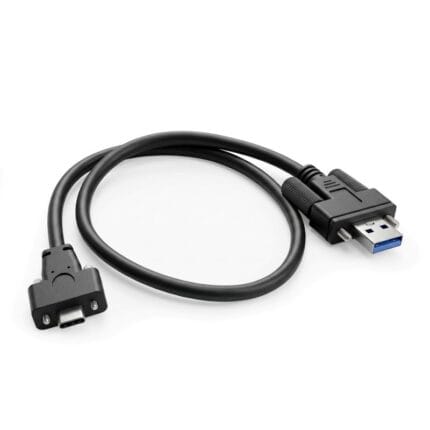
A right angle usb screw lock cable for shallow cabinets and vibrating frames: 90 degree Type-C plug, thumbscrew fixing, exit direction to your layout.
Overview
A right angle usb screw lock cable is the answer when a cabinet is too shallow for a straight plug and too shaky for a friction fit. The 90 degree end drops the connector depth to little more than the shell itself, so a display can sit against a wall or a door can close on a control panel, and the thumbscrew holds the joint so vibration does not walk the plug out. It is a male-to-male build, which means it is normally linking a device to a panel receptacle rather than extending a port.
Key Specifications
| Connector A | USB Type-C Male, Right-Angle 90 deg |
|---|---|
| Connector B | USB Type-C Male, Straight |
| Standard | USB 3.1 Gen1 |
| Data Rate | 5 Gbps |
| Lock | M2 thumbscrew on the angle end; M3 to your panel |
| Contact | Gold-Plated |
| Orientation | Right-Angle |
| Exit Direction | Clocked to order: up, down, left or right |
| Strain Relief | Molded PVC |
| Jacket | Black PVC; PUR where the run sees oil |
Depth is the reason to buy this
Work out the depth you have behind the equipment before you choose an exit direction. A straight USB-C plug plus its bend radius needs roughly 40 to 50 mm of clear space in front of the port. An angled plug needs the shell depth plus the cable diameter:
| Installation | Clearance needed | Straight plug | Right-angle plug |
|---|---|---|---|
| Wall-mounted display | 15 to 25 mm | Will not fit | Fits |
| Control cabinet door | 20 to 30 mm | Fouls the door | Fits |
| Behind a rack rail | Varies | Blocks the next port | Clears it |
| Bench or open frame | Unlimited | Fine | Fine, no advantage |
Depth figures above are the practical clearances we see on site, not a standard. Measure your own installation and send us the number.
Choosing the exit direction
The exit direction is the detail that gets missed. An angled plug can leave up, down, left or right relative to the port, and getting it wrong means the cable either fouls the housing or has to double back on itself:
- Down is the usual choice for a wall display, so the cable runs to the floor or into a conduit.
- Up suits a panel where the cable has to run along the top rail.
- Left or right suit racks where the cable has to run along a rail rather than away from the panel.
- Matched ends matter when two runs sit side by side and have to look deliberate.
The shell is USB-C and reversible, so there is no wrong way round on insertion, which is worth something when the port is behind a display and you cannot see it.
Why the original cable failed
- Kinked at the connector. A straight plug in a shallow cavity forces the cable into a bend tighter than it should take, and the bend is where it fails.
- Vibration fretting the contacts on a machine frame, showing up as a device that disappears from the host rather than a plug on the floor.
- Door or drawer trapping the plug and levering it sideways on every close.
- Cable weight on a horizontal port.
- Heat in a sealed enclosure with no airflow, which ages a standard jacket faster than expected.
Fitting and verifying the run
- Confirm the exit direction and the thread before you order: both are hard to fix on site.
- Seat the angled plug first, then the straight end, so the screw holes line up with the receptacle.
- Tighten the thumbscrew by hand. M2 threads strip easily and a stripped screw clamps nothing.
- Check in the host that the device enumerates at the rate you expect, not merely that it appeared.
- Close the door or mount the display and re-check. That is the condition the cable actually has to survive.
Typical Applications for This Right Angle USB Screw Lock Cable
- Wall-mounted displays and signage players with minimal rear clearance
- Control cabinets and machine frames where vibration is constant
- Industrial cameras and vision systems on moving axes
- Embedded systems and single board computers in shallow enclosures
- Kiosks and self-service terminals with a locked internal USB-C link
How to specify your build
- Exit direction on the angled end.
- Thread: M2 standard, M3 or 4-40 UNC to your receptacle.
- Length along the actual route.
- Standard: USB 3.1 Gen1, or USB 2.0 where the link allows it.
- Jacket: PVC, or PUR where there is oil or continuous flexing.
- Marking with your part number for fleet builds.
- Quantity, and whether this is a prototype or a production order.
Workmanship and testing
Assembly and inspection follow IPC/WHMA-A-620 Class 3 workmanship criteria under our ISO 9001 quality management system, and every unit passes 100% continuity and pinout testing before it is packed. Conductor range is 32 to 12 AWG. Thread sizes are verified against the drawing on the production batch. Values quoted for the interface are the industry-standard ones; your assembly is built and verified to the values on your drawing.
Material declarations against RoHS and REACH are issued per project, alongside the dimensional and electrical reports agreed at quotation; see certifications, compliance and material declarations. Where your drawing names a UL style or another approval, the build follows your drawing and ships with the supporting document rather than a claim of our own. Right-angle exits are molded rather than bent, following the exit forms and tooling described under right-angle cable assembly forms and tooling. More background: our build-to-print process. Tooling for this build is cut in our own tool room and belongs to your program, so a repeat run years later starts from the same tool.
Custom builds and ordering
Right-Angle USB Type-C Male prototype builds start from 1 to 50 pcs and are out in 3 working days. Production is quoted from 500 pcs at 14 working days after approval. Your part number and labeling go on OEM and ODM Right-Angle shipments, and material certificates and first-article reports come with them on request. We hold 100 sets of mold tooling in house, so a standard body costs no tooling time and a new exit direction adds about 10 working days.
Related screw-lock and right-angle assemblies
If the panel side needs a different interface, or the run has to be sealed:
- USB 3.1 Type-A Male to Type-C Female Screw-Lock Adapter Cable
- Screw-Lock Type-C 3.1 Extension Cable, Male to Female
- Right Angle Type-C Male to Female Socket with Screw-Lock
- USB-C Screw Locking Cable
- USB3 Vision Camera Cable with Locking Screws
- Circular USB-C Screw Cable with Metal M12 Style Coupling
- IP67 Waterproof USB-C Screw Cable
Full range: screw-lock molded cable assemblies.
Questions Before You Order
Which way does the angled plug point?
You choose. Up, down, left or right, clocked when the connector is assembled. Tell us on the order and we build it that way.
What thread is the screw?
M2 on the standard body. If your receptacle takes M3 or 4-40 UNC, name it and we supply that.
Is this an extension or a link?
It is a male-to-male link, so it normally runs between a device and a panel receptacle. For extending a port, use the male-to-female build.
Can I have both ends angled?
Yes, where the run turns at both ends. Give us the direction for each.
What is the minimum order?
Right-Angle USB Type-C Male prototype builds start from 1 to 50 pcs and are out in 3 working days. Production is quoted from 500 pcs at 14 working days after approval.
| Connector A | USB Type-C Male, Right-Angle 90 deg |
|---|---|
| Connector B | USB Type-C Male, Straight |
| Standard | USB 3.1 Gen1 |
| Data Rate | 5 Gbps |
| Lock | M2 thumbscrew on the angle end; M3 to your panel |
| Contact | Gold-Plated |
| Orientation | Right-Angle |
| Strain Relief | Molded PVC |
| Exit Direction | Clocked to order: up, down, left or right |
| Jacket | Black PVC; PUR where the run sees oil |