USB-C to DisplayPort Cable for High Refresh Monitors
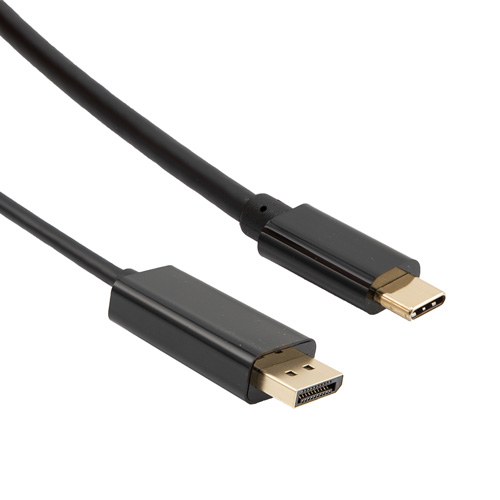
A USB-C to DisplayPort cable carries native DisplayPort signaling out of a USB-C port, bi-directional and without a converter in the path. Latching shell, gold plated contacts, reinforced molding at the USB-C end. Tell us your source, monitor and target refresh format and we will build the length to it.
Overview
A high refresh monitor is unforgiving of a weak link: the picture either holds at the
format you bought the panel for, or the source quietly negotiates down and you spend an afternoon wondering
why 144 Hz feels like 60. A USB-C to DisplayPort cable sits at that boundary, carrying
native DisplayPort signaling out of a USB-C port that has no video connector of its own. Getting it right is
less about the cable brand and more about whether the port, the lane count and the length all agree on the
format you want.
Key Specifications
| Interface | USB-C male to DisplayPort male |
|---|---|
| Direction | Bi-directional |
| Stock length | 1 m (further lengths on request) |
| DisplayPort shell | Latching, with release button |
| Contact finish | Gold plated both ends |
| Strain relief | Reinforced molding at the USB-C end |
| Fitment | Laptops, docks and monitors with a DisplayPort alternate mode |
| Compliance files | Pending supplier confirmation |
| Lane configuration | Two or four lanes, set by the source and the port |
| Build option | Custom lengths and private labeling on request |
What DisplayPort Alt Mode actually does
The USB-C connector is a shell with a lot of high speed pairs inside it. In
DisplayPort
alternate mode, some of those pairs are reassigned from USB data to DisplayPort lanes. Two details follow
from that, and they explain most of the support calls.
First, a USB-C port is not obliged to carry video. The connector looks identical on a laptop that
supports an alternate mode and on one that does not, so the reliable check is the port marking or the
specification sheet. Second, the port may assign two lanes or four lanes to DisplayPort. With two lanes
there is half the bandwidth available, which is why the same cable can drive a panel at full rate on one
machine and drop to a lower format on another.
The bandwidth budget
DisplayPort link rates are published by VESA and are the same whether the signaling leaves a full size
DisplayPort connector or a USB-C connector in alternate mode. The raw rate is per lane; the payload figure is
what is left after line encoding, and the video payload is lower again once packet overhead is taken out.
| Link rate | Raw rate per lane | Four lane encoded payload | Where it sits |
|---|---|---|---|
| RBR | 1.62 Gbit/s | 5.184 Gbit/s | Legacy and fallback |
| HBR | 2.70 Gbit/s | 8.64 Gbit/s | Early DisplayPort |
| HBR2 | 5.40 Gbit/s | 17.28 Gbit/s | DisplayPort 1.2 generation |
| HBR3 | 8.10 Gbit/s | 25.92 Gbit/s | DisplayPort 1.3 and 1.4 generation |
Those are published figures for the standard, quoted here as industry definitions. The performance your
assembly is built and verified to is the figure stated on your drawing, and where a specific combination of
source, monitor and length matters we would rather test that combination than quote a generic number.
8-bit versus 10-bit, and why refresh rate eats the budget
Three things consume the link at once: resolution, refresh rate, and bits per color. They multiply rather
than add. Going from 8-bit to 10-bit raises the demand by roughly a quarter on its own, which is precisely
the margin a 4K panel at 120 Hz does not have.
| Format | Relative demand | Practical note |
|---|---|---|
| 1080p at 60 Hz, 8-bit | Lowest of these | Comfortable on almost any link |
| 1440p at 144 Hz, 8-bit | Mid | Where most high refresh desktop panels sit |
| 4K at 60 Hz, 10-bit | High — a commonly cited figure for the uncompressed video payload is around 15.7 Gbit/s | Fits inside a four lane HBR3 payload |
| 4K at 120 Hz, 10-bit | Above a four lane HBR3 payload uncompressed | Relies on display stream compression, which both ends must support |
If a monitor is not reaching its stated refresh rate, check the color depth setting in the operating
system before blaming the cable.
Cable or converter: the difference that matters
A USB-C to DisplayPort cable is a passive assembly. It reassigns pins and carries DisplayPort signaling
across them; it does not translate anything. That is why it works in both directions when both ends are
DisplayPort capable, and why it cannot make a port that has no alternate mode produce video.
An active converter is a different product: it has electronics in the shell, it translates one protocol
into another, it draws power, and it is directional by design. That is what you need when one side is not
DisplayPort at all. It also costs more and fails sooner, because the electronics in the plug are the part
that gets hot and knocked.
This build is the passive cable. It is bi-directional, so the same stock covers a USB-C source into a
DisplayPort monitor and a DisplayPort output into a USB-C monitor input, which matters on shared desks where
the hardware changes from week to week.
What to check before ordering
- Confirm the USB-C port carries an alternate mode and not just charging and data
- Confirm what the monitor input accepts at the refresh rate and color depth you want
- Count the lanes the port assigns when it also carries USB data — two lanes is half the budget
- Measure the distance, including the route behind a monitor arm or under a desk
Build details
Contacts are gold plated on both ends so mating resistance stays stable across repeated plugging. The
DisplayPort shell carries a latch with a release button, so the plug stays seated when a monitor is moved on
its arm but still comes off cleanly without tools. The molded strain relief at the USB-C end is reinforced,
since that is the connector most often pulled sideways by a laptop shifted across a desk.
Typical applications for this USB-C to DisplayPort cable
- Engineering and CAD workstations driving high refresh desktop monitors
- Trading and control room desks running several panels from one machine or dock
- Studio and edit bays where color work needs a stable, uncompressed link
- Shared meeting rooms where presenters arrive with mixed laptop hardware
- Room builds where the long run to the display needs an active optical HDMI cable instead
How to specify your build
- Source and monitor — makes and models, so we can confirm the port and the input.
- Target format — resolution, refresh rate and color depth.
- Length, measured along the route, not as a straight line.
- Latch or no latch — latching for fixed desks, low profile for a bag.
- Length verification — where the run matters, ask us to test your combination.
- Quantity, and whether this is a sample, a rollout, or a private label order.
Workmanship and testing
For USB-C builds the line runs to IPC/WHMA-A-620 Class 3 under ISO 9001, terminating 32 to 12 AWG. Each USB-C unit passes a 100% continuity and pinout check before it ships, and seal checking is quoted whenever an ingress rating is on the drawing.
RoHS and REACH declarations are provided per project together with the agreed test reports; the documentation scope is listed under certifications and compliance. If your drawing specifies a UL style, we build to that drawing and supply the UL reference with the shipment instead of substituting an equivalent. Injection parameters for this part are developed against the jacket material using the approach documented under how we run the overmold press. Related reading: what stage and studio work demands. Any tooling we cut for this part stays yours, maintained in our own tool room under your part reference.
Custom builds and ordering
USB-C prototype lots start from 1 to 50 pcs and ship in 3 working days. Production requires 500 pcs and runs 14 working days after approval. Tooling not already held adds around 10 working days. Private-label USB-C runs ship under your part number and labeling, and material certificates and first-article reports are on offer.
Related video and data assemblies
- DP80 DisplayPort Cable with Latching Connector
- DisplayPort Screw Lock Cable for Control Room and Kiosk Displays
- USB-C Active Optical Cable for Long-Reach USB4 Class Links
- Ultra High Speed HDMI Cable for 8K Video Walls
- USB4 80Gbps Cable for Docks, 8K Displays and eGPU Enclosures
- USB-C Gen2 Data Cable, 10 Gbps, with 100 W Power Delivery
Full range: audio and video cable assemblies.
Frequently Asked Questions
Will this make any USB-C port output video?
No. The port has to support a DisplayPort alternate mode. The connector looks the same either way, so
check the port marking or the machine specification.
Can I run it in either direction?
Yes, provided both ends are DisplayPort capable. It covers a USB-C source into a DisplayPort monitor, or
a DisplayPort output into a USB-C monitor input.
My monitor will not reach its stated refresh rate. Is the cable at fault?
Often it is the color depth setting. Drop from 10-bit to 8-bit and see whether the format returns. Then
check whether the port is assigning two lanes instead of four.
How long can this run be?
Length, source and monitor have to be considered together. Tell us the distance and target format and we
will say whether a passive build holds it.
| Interface | USB-C male to DisplayPort male |
|---|---|
| Direction | Bi-directional |
| Stock length | 1 m (further lengths on request) |
| DisplayPort shell | Latching, with release button |
| Contact finish | Gold plated both ends |
| Strain relief | Reinforced molding at the USB-C end |
| Fitment | Laptops, docks and monitors with a DisplayPort alternate mode |
| Compliance files | Stated per your drawing |
| Lane configuration | Two or four lanes, set by the source and the port |
| Build option | Custom lengths and private labeling on request |
Related products
Assistive Listening Neckloop with Breakaway Safety Release
Turntable Tonearm Cable with DIN and Dual RCA Options
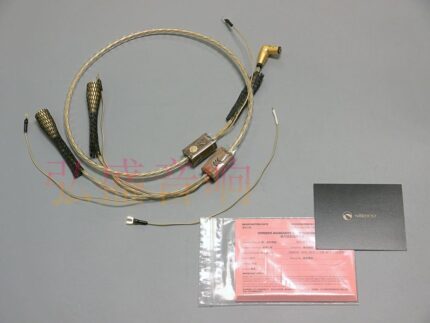
A turntable tonearm cable is the one link in a vinyl system where the wiring, the screening and the ground path are all audible. Built with DIN 5-pin or dual RCA ends, a separate ground spade and two shielding layers, to the pinout on your drawing. Send a photo of the back of the deck and we will match it.