

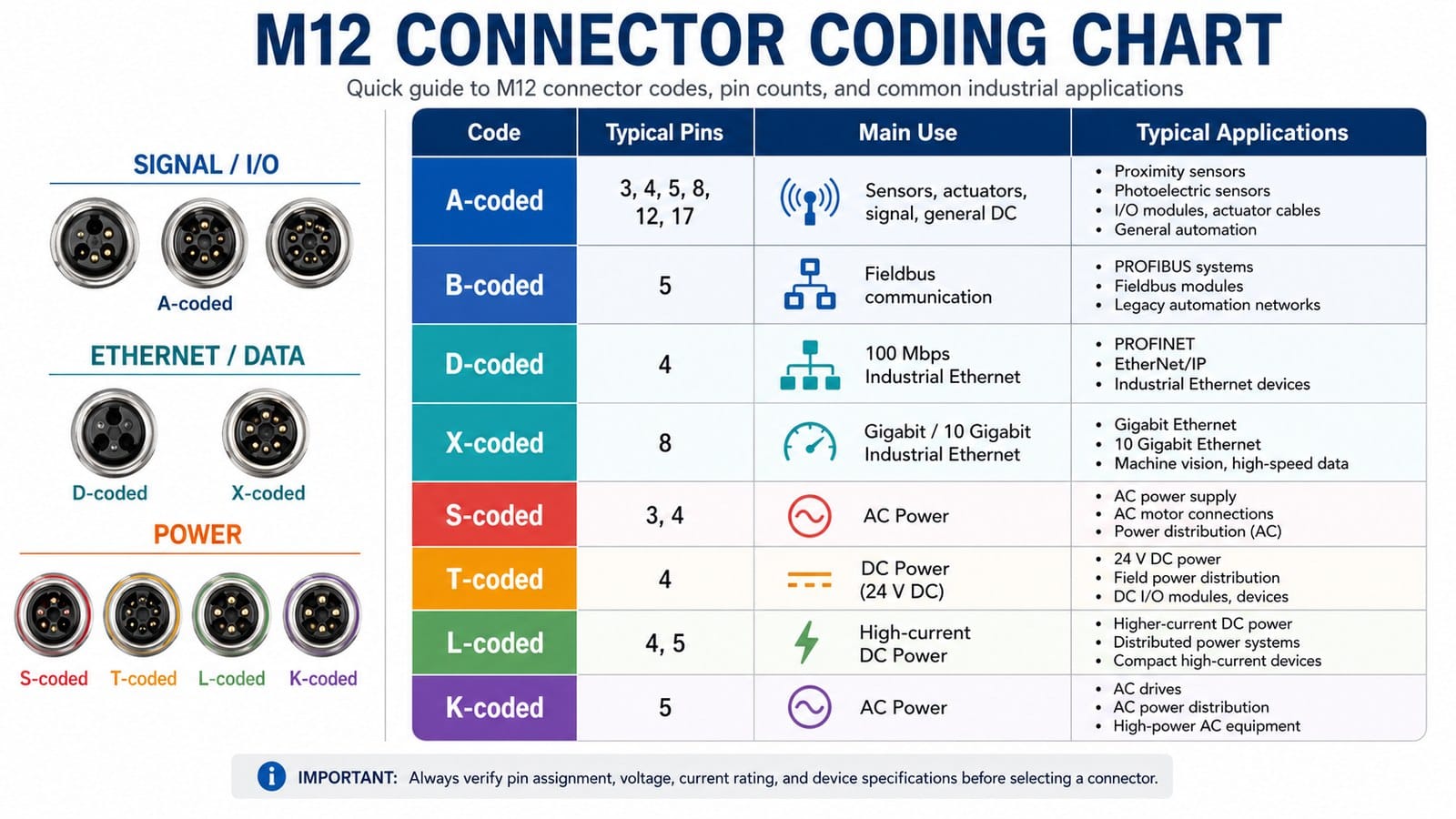
If you have ever stood in front of a control cabinet trying to figure out why two cables that look identical will not mate, the answer is almost always coding — the small keyway on the connector face that physically prevents mismating. In industrial automation, M12 connector coding (and its smaller sibling, M8) defined under IEC 61076-2-101 / -104 / -109 / -111 / -113 is the de-facto standard for sensors, actuators, fieldbus, industrial Ethernet, and increasingly for power. With M12 alone shipping in nine+ coding variants (A, B, C, D, X, L, P, S, T plus the newer K, M, and Y), picking the wrong one is surprisingly easy.
This M12 connector coding guide puts the entire selection logic on one page: a side-by-side comparison of M8 vs M12, a code-by-code breakdown of every common M12 coding type, and a decision tree you can follow the next time you specify a cable.
1. Why M8 and M12 Dominate Industrial Cabling
Both M8 (8 mm thread) and M12 (12 mm thread) connectors are defined by the IEC 61076-2 family of standards. They share three properties that have made them standard on every sensor, PLC, drive, and industrial Ethernet port made in the last two decades:
- Screw-locking thread — survives constant vibration better than RJ45, USB, or push-pull connectors.
- High IP rating — typical IP67 / IP68, with M12 reaching IP69K for high-pressure washdown.
- Standardized keying (coding) — same outer thread, different keyway = impossible to plug the wrong cable into the wrong port.
The “M” in M8 / M12 is the metric thread size in millimeters; everything else about them — pin count, voltage class, data rate, intended protocol — is encoded in the suffix letter.
2. M8 vs M12 at a Glance
| Specification | M8 | M12 |
|---|---|---|
| Outer thread | M8 × 1.0 | M12 × 1.0 |
| Pin count (typical) | 3, 4, 5, 6, 8 | 3, 4, 5, 8, 12, 17 |
| Rated current | up to ~3–4 A | up to 16 A (power codes) |
| Rated voltage | up to 60 V | up to 630 V AC (power codes) |
| Data rate | up to 100 Mbit/s (D-coded) | up to 10 Gbit/s (X-coded) |
| IP rating | IP67 / IP68 | IP67 / IP68 / IP69K |
| Available codes | A, B, D | A, B, C, D, X, L, P, S, T, K, M, Y |
| Operating temperature | −40 °C to +85 °C typical | −40 °C to +85 °C industrial / +125 °C premium |
| Cabling | Smaller OD, lightweight | Larger OD, more rugged |
One-line rule of thumb: If the device is a small sensor in tight quarters → M8. If it is anything else on the factory floor → M12.
3. When to Use M8 (and When to Walk Past It)
M8 is a specialist. Use it when all four of the following are true:
- Space is the limiting factor. M8 connectors are roughly 30–40 % smaller than M12, which matters on miniature photoelectric sensors, miniature solenoid valves, encoder tails, compact flow meters, and the inside of robot fingers.
- Current is small. Anything below ~2 A per contact (typical 3-pin or 4-pin sensor).
- Voltage is low. Most sensor circuits are 24 V DC; the standard M8 limit is 30–60 V.
- No high-speed data. If you need 100 Mbit/s Ethernet you can move up to M8 D-coded (4 pins, 100 Mbit/s, 60 V), but anything faster than that means M12.
Typical M8 applications
- Proximity / inductive / capacitive sensors
- Photoelectric sensors and through-beam receivers
- Temperature, pressure, level, and flow sensors in compact heads
- Small pneumatic solenoid valves
- Encoder feedback on miniature stepper motors
- Battery-powered handheld instruments
If you need to deliver power (not just signal), you have probably already outgrown M8.
4. When to Use M12 (the Default Choice)
M12 is the default connector on the modern factory floor because it covers everything from a 24 V DC sensor to a 3-phase drive. Use it whenever:
- You need more than 3–4 A (any motor, drive, valve bank, industrial lighting).
- You need higher voltage (M12 power codes S / K / L / T cover 63 V DC and 630 V AC).
- You need industrial Ethernet — D-coded for 100 Mbit/s, X-coded for 1 / 10 Gbit/s.
- You need fieldbus — B-coded for PROFIBUS, P-coded for EtherCAT P, Y-coded for hybrid power + data.
- You expect vibration, washdown, or outdoor exposure — IP67 / IP68 / IP69K with proper cable glands.
- You want the broadest second-source ecosystem — M12 is offered by virtually every connector and cable assembly manufacturer worldwide.
Typical M12 applications
- PLC I/O blocks, distributed I/O, valve manifolds
- Servo drives and stepper drives (power codes S / T / L / K / M)
- Industrial Ethernet switches, IP cameras, machine vision (D-coded and X-coded)
- PROFIBUS DP networks (B-coded)
- Food & beverage lines requiring IP69K washdown
- Outdoor equipment: traffic systems, wind turbines, EV charging auxiliaries
5. The M12 Connector Coding System Explained
The thread is always M12 × 1.0. What changes between codes is:
- the keyway (a small notch / lug on the coupling nut),
- the pin count and pin geometry,
- the rated voltage and current,
- the transmission protocol the geometry is designed to carry.
Because two different codes will not physically mate, M12 connector coding lets you run a 24 V sensor cable and a 630 V drive cable through the same panel without risk of someone mixing them up. The chart at the top of this article groups the eight most common codes by what they actually carry on the factory floor:
Signal / I/O (A, B) — sensor and fieldbus signals to and from the PLC.
Ethernet / Data (D, X) — industrial Ethernet at 100 Mbit/s up to 10 Gbit/s.
Power (S, T, L, K) — AC or DC power delivered through a standardized M12 form factor.
The following sections walk each code in turn.
5.1 Signal / I/O Codes (A, B)
A-Coded — The Universal Sensor Code
- IEC: 61076-2-101
- Typical pins: 3, 4, 5, 8, 12, 17
- Rating: 30–250 V, 1.5–4 A
- Used for: Proximity sensors, photoelectric sensors, I/O modules, actuator cables, general automation
A-code is the default M12 connector coding for sensor and actuator wiring on a PLC. If your cable is going to an inductive proximity switch, a pressure transmitter, or a 24 V solenoid valve, it is almost certainly A-coded. The wide range of pin counts (3-pin for bare sensor, 4/5-pin for standard signal, 8/12/17-pin for hybrid signal + low-rate data) is why A-coded M12 is sold by every connector manufacturer on the planet.
B-Coded — PROFIBUS DP Fieldbus
- IEC: 61076-2-101
- Typical pins: 5
- Rating: 60 V, 4 A
- Used for: PROFIBUS systems, fieldbus modules, legacy automation networks
B-code locks you into the 12 Mbit/s PROFIBUS DP physical layer. On a modern greenfield PROFINET installation you would use D-code instead, but there are hundreds of thousands of PROFIBUS nodes still in service in factories worldwide — that is where B-coded M12 still earns its keep.
5.2 Ethernet / Data Codes (D, X)
D-Coded — 100 Mbit/s Industrial Ethernet
- IEC: 61076-2-101 / -109
- Typical pins: 4 (two shielded twisted pairs)
- Rating: 60 V, 4 A
- Used for: PROFINET, EtherNet/IP, industrial Ethernet devices
D-code is the workhorse of industrial Ethernet. It carries two pairs, which limits it to Fast Ethernet (100 Mbit/s) — but for the vast majority of sensor networks and machine-to-machine traffic, 100 Mbit/s is plenty. It also supports Type 1 PoE (15 W), which is enough for many IP cameras and wireless access points.
X-Coded — Gigabit / 10 Gigabit Industrial Ethernet
- IEC: 61076-2-109
- Typical pins: 8 (four individually shielded pairs)
- Rating: 50 V AC / 60 V DC, 0.5 A per contact (data ratings)
- Used for: Gigabit Ethernet, 10 Gigabit Ethernet, machine vision, high-speed data
X-code is the high-end industrial Ethernet connector. Every pair is individually shielded, which is what lets it carry Cat 6A signals at 10 Gbit/s in a vibration environment. If you are running machine vision with multi-gigapixel cameras, real-time control loops above 1 ms, or want PoE++ to power a remote panel, you need X-coded M12.
5.3 Power Codes (S, T, L, K)
S-Coded — AC Power
- IEC: 61076-2-111
- Typical pins: 3, 4 (2 + PE or 3 + PE)
- Rating: up to 630 V AC, 12 A (typical) / 16 A (max)
- Used for: AC power supply, AC motor connections, AC power distribution
S-coded cordsets are the modern way to deliver AC mains power to motors, pumps, and fans on the factory floor. The 630 V rating gives headroom for both 230 V (European / Asian single-phase) and 480 V (US three-phase delta line-to-line) environments when paired with the right code variant.
T-Coded — DC Power (24 V DC)
- IEC: 61076-2-111
- Typical pins: 4 (no PE)
- Rating: up to 63 V DC, 12 A (typical) / 16 A (peak)
- Used for: 24 V DC power, field power distribution, DC I/O modules and devices
T-coded cordsets are designed for 24 V DC distribution — the workhorse supply voltage of any control cabinet. Four pins, no PE, optimized for power transfer to DC loads like drives, solenoid manifolds, and remote I/O blocks.
L-Coded — High-Current DC Power
- IEC: 61076-2-111
- Typical pins: 4, 5 (4 + FE functional earth)
- Rating: 63 V DC, up to 16 A per contact
- Used for: Higher-current DC power, distributed power systems, compact high-current devices
L-code is the modern DC power answer to 7/8″ legacy connectors. Same idea — deliver amps, not data — but in the M12 form factor so the cabinet layout stays consistent. Many PROFINET devices accept up to 16 A of 24 V DC through an L-coded cordset, letting you power drives, lighting, and IO blocks from a single cable. It pairs especially well with T-code when you need PE elsewhere in the panel.
K-Coded — AC Power (Three-Phase)
- IEC: 61076-2-111
- Typical pins: 5 (4 + PE for three-phase wye)
- Rating: up to 630 V AC, 12 A (typical) / 16 A (max)
- Used for: AC drives, AC power distribution, high-power AC equipment
K-coded cordsets are built for three-phase AC loads — small AC motors and AC drives up to around 7.5 kW. Use K alongside S: S for single-phase and lighting circuits, K for three-phase wye motors.
5.4 Codes You Will See Less Often
A handful of further M12 codes turn up on drawings and drive spec sheets even if they are not on the everyday chart:
- P-code (4 pins, 60 V, 4 A) — EtherCAT P hybrid that bundles 100 Mbit/s data and 24 V power on a single cable. The standard pick for motion-control drops where you would otherwise need both a D-coded data cable and an L-coded power cable.
- Y-code (8 pins hybrid) — power + 100 Mbit/s Ethernet in a single connector. Popular in compact vision cameras and integrated automation systems.
- M-code (5 + PE, 630 V AC, 8 A) — servo drives with auxiliary signal pair; widely used on modern servo motor power cables.
- C-code (3–6 pins, 250 V AC, 4 A) — legacy AC sensors and small AC actuators, mostly displaced by S-code on new equipment.
- US-code — North American variant for power distribution.
You do not need to memorise them — just know they exist so you are not surprised when a servo drive spec sheet lists “M-coded M12 power, female, 5+PE”.
6. M12 Code Selection — One Table
| If you need to deliver… | Pick this code | Typical rating |
|---|---|---|
| 24 V sensor / actuator signal (proximity, photoelectric, valve) | A | 4 A, 60 V |
| PROFIBUS DP or other legacy fieldbus | B | 4 A, 60 V |
| 100 Mbit/s PROFINET / EtherNet/IP / EtherCAT | D | 4 A, 60 V |
| 1 Gbit/s or 10 Gbit/s Ethernet / vision / PoE++ | X | 0.5 A per data contact, 50/60 V |
| EtherCAT P (data + 24 V on one cable) | P | 4 A, 60 V |
| Hybrid power + 100 Mbit/s Ethernet (cameras) | Y | 6 A power + 0.5 A data |
| Single-phase AC power (230 V / 480 V) | S | 12–16 A, 630 V AC |
| 24 V DC field power (no PE) | T | 12 A, 63 V DC |
| Higher-current DC power with PE | L | 16 A, 63 V DC |
| Three-phase wye AC motor (small) | K | 12–16 A, 630 V AC |
| Servo motor (3-phase + auxiliary signals) | M | 8 A, 630 V AC |
7. A Four-Step Selection Flowchart
START
  │
  ├─ Is the device a small sensor in tight space + < 2 A + < 60 V?
  │       → YES → M8 A-coded (or D-coded if Ethernet)
  │       → NO  ↓
  │
  ├─ Is the load DATA only (≤ 100 Mbit/s, simple sensor network)?
  │       → YES → M12 D-coded (most common); X-coded if you need 1/10 Gbit/s
  │       → NO  ↓
  │
  ├─ Is the load POWER only (no data)?
  │       ├─ DC field power (24 V, with PE)        → M12 L-coded
  │       ├─ DC drive power (24 V, no PE)          → M12 T-coded
  │       ├─ AC single-phase (230 V / 480 V)       → M12 S-coded
  │       └─ AC three-phase wye (small motor)      → M12 K-coded
  │
  └─ Is the load BOTH power AND data on a single cable?
          ├─ EtherCAT P, 100 Mbit/s + 24 V         → M12 P-coded
          └─ 100 Mbit/s + 6 A power (vision)       → M12 Y-coded
If you still get stuck, the typical default is A-code for signals, D-code for Ethernet, S-code for AC power, L/T-code for DC power — that combination covers roughly 80 % of industrial connections.
8. Application Matrix by Industry
| Industry | Typical M12 codes used |
|---|---|
| Factory automation (general) | A, D, S, T, L |
| Machine vision | D (100 Mbit/s), X (1/10 Gbit/s), Y (hybrid) |
| Automotive (body / paint / assembly) | A (sensors), X (vision), L / T (drive power), M (servo) |
| Food & beverage / packaging | A, D, X (all IP67 / IP69K required) |
| Logistics / AGV / AMR | T (DC battery drive), D / X (fleet comms) |
| Energy / wind / solar | L (DC string), A (sensor), S / K (auxiliary AC) |
| Outdoor / traffic / rail | S, K, L with IP67/IP68 housing, UV-resistant jacket |
| Process instrumentation | A (4–20 mA), D (instrumentation bus), occasionally Y |
9. Common Mistakes to Avoid
- Ordering by “M12” without specifying the code. Two M12 cordsets that look almost identical can be S or L, and the difference is 630 V AC vs 63 V DC — a recipe for a burn-down.
- Choosing D-code when you need 1 Gbit/s. D-code is 100 Mbit/s only. If your vision camera or wireless AP needs more, step up to X-code.
- Re-using a 4-pin A-coded cordset for Ethernet. The pinout is different — it will not plug in mechanically if you force it, and nothing will work.
- Ignoring IP69K in washdown environments. IP67 is fine for splash, but food / beverage and outdoor washdown need IP69K — confirm with the cable gland, not just the connector body.
- Using a non-shielded cordset on X or D-code. Industrial Ethernet without 360° shielding will pass a continuity test and still fail in EMI-heavy panels.
10. Frequently Asked Questions
- Are M8 and M12 cables interchangeable?
- No. The thread diameter is different (8 mm vs 12 mm) and they will not mate. An M8 cable will not plug into an M12 port, and vice versa.
- Can one M12 code carry both power and data?
- Yes — Y-code (100 Mbit/s + power) and P-code (EtherCAT P) are hybrid designs for exactly that use case. For most other applications, power and data are run on separate M12 cordsets to keep field service simple.
- Is X-coded M12 the same as Cat 6A?
- Functionally, yes. X-coded M12 with shielded twisted-pair cable rated to Cat 6A will support 10 Gbit/s Ethernet the same way an RJ45 patch cord does, but with screw-locking, vibration tolerance, and IP rating.
- Which M12 code should I use for a 24 V / 10 A DC drive?
- L-coded (4 + FE, 16 A, 63 V DC) is the most flexible and the most common choice. If the drive does not need PE on the connector, T-coded (4 pins, no FE, 12 A) is a lighter alternative.
- Can I cut and re-terminate an M12 cordset in the field?
- Technically yes, but you will almost certainly lose the IP rating and the shielding performance. For most applications, premolded cordsets with strain-relief molding are more reliable.
- What’s the difference between M12 S-code and M12 K-code?
- S-code is single-phase AC (3–4 pins); K-code is three-phase wye (5 pins). Use S for single-phase loads like lighting and small pumps; use K for three-phase wye motors.
- Does the coding protect against voltage only, or also against protocol?
- Against both. For example, a D-coded M12 and an X-coded M12 both carry Ethernet, but D is 100 Mbit/s while X is up to 10 Gbit/s — different pin geometries prevent both mechanical mis-mating and electrical mismatch.
11. Quick Reference: What to Specify on Your Next PO
When you order a custom M12 cable assembly, you should be able to fill in this checklist without hesitation:
- Connector type at each end (M8 or M12; male or female; straight or right-angle; molded or field-attachable)
- Coding at each end (A, B, D, X, S, T, L, K — plus P / Y / M for specialist applications)
- Pin count (3, 4, 5, 8, 12, 17)
- Cable type (PVC / PUR / TPE jacket; shielded or unshielded; static or drag-chain)
- Cable OD (must fit the connector’s strain relief)
- Length
- IP rating required at the mated interface (IP67, IP68, IP69K)
- Operating temperature range (especially if outdoor, inside a cold storage, or near a motor)
A good cable-assembly supplier will ask you most of these anyway. A great one will help you fill in the rest.
12. Closing Thoughts
The M8 vs M12 choice is rarely a debate; it is usually determined by current and space. The harder decision is which M12 code to use, because once you commit to a code across a machine, you commit to a rated voltage, current, and often a protocol. When in doubt:
- A for signals and DC supply up to 60 V,
- B for PROFIBUS DP / legacy fieldbus,
- D for Fast Ethernet (PROFINET, EtherNet/IP),
- X for Gigabit and 10 Gigabit Ethernet / PoE++,
- S for single-phase AC power,
- T for 24 V DC field power without PE,
- L for higher-current DC power with PE,
- K for three-phase AC power.
If you are about to design a new machine, prototype with stock M12 cordsets first — every major supplier carries the common codes in 1 m, 3 m, 5 m, and 10 m lengths. Once you have validated the layout, lock in the cable spec and only then start customizing cable length, jacket material, or connector head shape.
Need a specific M12 code in a custom length, shielding, or jacket? Contact us with your pin count, code, current, and application, and we’ll spec the right cable on the first round.